
India's #1 Trusted Hard Disk Data Recovery Specialists
We recover data from crashed, clicking, beeping, dead, and corrupted hard drives using a professional cleanroom lab. Strict No Data, No Charge guarantee.
Why Mumbai Data Recovery?
RECOVERY RATE
YEARS EXPERIENCE
CASES RECOVERED
GOOGLE RATING
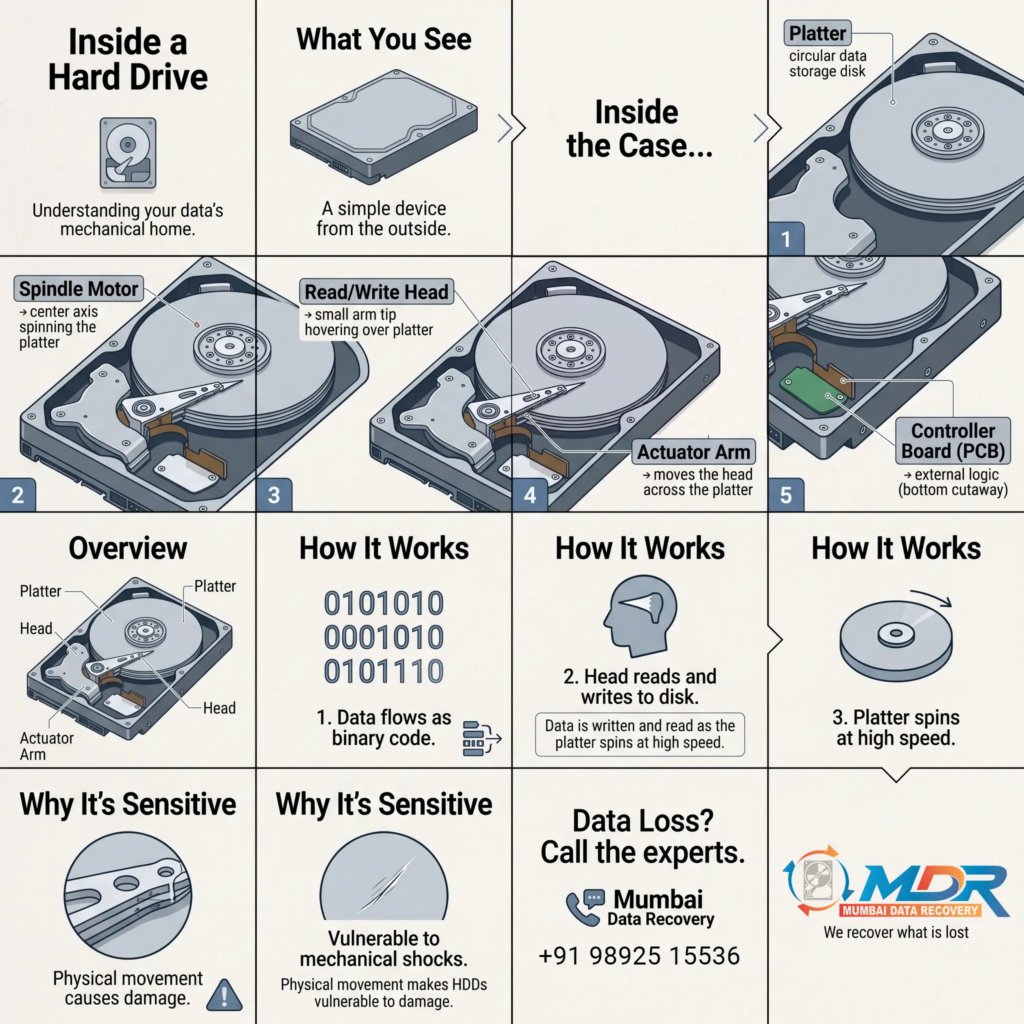
How a Hard Disk Drive Works And Why It Fails
Understanding the precision engineering inside an HDD helps explain why professional recovery is the only safe option when something goes wrong.
Platters (Magnetic Discs)
Ultra-smooth aluminium or glass discs coated with a magnetic oxide layer. Data is stored as magnetised polarities across billions of microscopic sectors. A typical 4TB HDD platter spins between 5,400 and 7,200 RPM. Any platter scratch permanently destroys that data zone.
Read/Write Heads
The most failure-prone component. Each platter surface has its own head, floating on a cushion of air just 3–5 nanometres above the surface thinner than a fingerprint. A head crash (contact with the platter) is catastrophic and requires cleanroom intervention.
Actuator Arm & Voice Coil
Positions the read/write heads with sub-micrometre precision over 500,000+ tracks. Controlled by a voice coil motor (VCM) that reacts to magnetic current. A damaged or miscalibrated actuator arm is a common cause of the clicking sound in a failed hard drive.
Spindle Motor
Spins the platters at a constant speed. When the motor seizes, the drive fails to spin up and becomes completely unresponsive. Motor failure is recoverable via a cleanroom transplant procedure and represents approximately 12% of physical failure cases.
PCB (Printed Circuit Board)
The drive's electronic controller managing power regulation, data buffering, and communication with your computer. PCB damage from voltage spikes or short circuits causes the drive to be completely undetected. Critically, each PCB is programmed with drive-specific firmware data stored in flash memory; a direct swap of PCBs without firmware transfer will fail.
Firmware Module
A low-level operating system embedded in both the PCB flash chip and reserved sectors on the platter surface. Firmware manages the drive's grown defect list (G-List), translator tables, and self-calibration routines. Corruption of firmware is insidious the drive may spin up normally but fail to detect or produce random errors, making it one of the most misdiagnosed failure modes.
HDD Failure Cause Breakdown - Mumbai Data Recovery Lab Data
Based on 10,000+ cases processed at Mumbai Data Recovery lab, 2010–2026.
Average HDD Lifespan Reference
Note: These are statistical averages. Individual drives can fail within months or last over a decade depending on operating conditions, temperature, vibration, and power quality.
Supported Capacities
All Brands Recovered
Hard Drive Failure Warning Signs - Don't Ignore These
HDDs rarely fail without warning. Recognizing these symptoms early can be the difference between a straightforward logical recovery and a complex mechanical intervention. If you are experiencing any of these signs, back up your data immediately and contact us for a free evaluation.
Common Hard Disk Problems - Technical Breakdown
Every HDD failure has a specific recovery approach. Understanding the failure mode helps set realistic expectations and choose the right recovery pathway.
Head Crash & Read/Write Head Failure
When read/write heads physically contact the platter surface, the resulting scoring can destroy data permanently. Even a soft crash (heads touching without scoring) causes the heads to misalign, producing the characteristic clicking sound. This is the most common physical failure and requires cleanroom head replacement with donor heads matched to the same head-disk assembly (HDA) family.
Motor Failure & Seized Spindle
The spindle motor seizes when bearing lubrication degrades, the drive experiences physical shock, or power fluctuations cause coil burnout. A seized drive produces no spin-up sound at all complete silence when powered on. Recovery requires cleanroom spindle motor replacement or platter migration to a donor HDA, a delicate procedure requiring precise platter stack alignment.
PCB Damage & Controller Failure
The PCB translates commands between your computer and the drive's mechanical components. Power surges from UPS failures, inverters, or direct short circuits can fry the TVS diodes, ROM chip, or motor controller IC. A key fact that most people miss: the ROM chip on the PCB stores drive-specific adaptive data (including the defect map). Swapping a PCB without transferring this ROM chip is one of the most common DIY mistakes that destroys drives.
Firmware Corruption & SA Zone Damage
HDD firmware resides in a reserved area on the platter called the Service Area (SA). It contains module structures managing the grown defect list, translator tables, and calibration data. When SA modules become corrupted (from bad sectors, improper shutdown, or manufacturing defects), the drive may spin up normally but fail to initialise, show 0 capacity, or display wrong model numbers. This is one of the most complex and misdiagnosed failure modes. Requires specialist tools like PC-3000, DeepSpar, or MRT Pro.
Corrupted File System & Partition Loss
NTFS, FAT32, exFAT, and EXT4 file systems maintain complex metadata structures (MFT, FAT tables, superblocks, journal logs) that can become corrupted from abrupt power loss, OS crashes, virus attacks, or software conflicts. The underlying data sectors are almost always intact, it is only the directory structure that is damaged. Professional logical recovery tools rebuild these structures without overwriting original data sectors.
Bad Sectors & Reallocated Sector Escalation
All HDDs encounter some bad sectors during their lifetime and attempt to remap them to spare sectors. When the Reallocated Sector Count (SMART attribute 05) begins escalating rapidly, the drive is in a critical phase. the spare pool is exhausting. Running software-based recovery tools on a drive with escalating bad sectors causes additional head passes that worsen sector damage. Professional imaging using specialised hardware (like DeepSpar Disk Imager) is essential to create a sector-level clone before any recovery attempt.
Accidental Format & Deletion Recovery
When you format a drive or accidentally delete files, the operating system does not immediately erase the data. it marks the space as available and removes directory entries. The actual data sectors remain intact until overwritten by new data. Time is your most critical factor: the more the drive is used after deletion or formatting, the higher the probability that overwriting has occurred. Logical recovery from an accidental format has a near-100% success rate when the drive is powered off immediately after the accident.
Encrypted Disk & BitLocker Recovery
Drives encrypted with BitLocker, VeraCrypt, FileVault, or hardware-level encryption present a unique challenge: even perfectly recovered sectors are unreadable without the decryption key or recovery certificate. Our approach always begins by recovering the raw encrypted image first, then assisting with key reconstruction where cryptographically feasible, or working with your IT team to apply the recovery key to the recovered image.
CCTV & DVR Hard Drive Recovery
Surveillance HDDs use proprietary recording formats (H.264, H.265 streams written in DVR-specific file containers) that standard recovery tools cannot interpret. DVR drives also undergo continuous overwrite cycles, which means recovery must happen quickly. We support recovery from all major DVR brands including Hikvision, Dahua, CP Plus, Honeywell, and Bosch, extracting readable video footage from damaged or partially overwritten drives.
What To Do (and Not Do) When Your Hard Drive Fails
The actions you take in the first 30 minutes after a hard drive failure are the most critical for data recovery outcomes.
Do These Things
- ✓Power off the drive immediately when you notice failure symptoms - clicking, freezing, or errors.
- ✓Note exactly what you heard, saw, or what error message appeared, this helps with diagnosis.
- ✓Handle the drive gently. Avoid vibration, shocks, or placing it on conductive surfaces.
- ✓Store the drive in an anti-static bag at room temperature, away from magnets and moisture.
- ✓Call a professional recovery service before attempting anything, a free evaluation costs you nothing.
- ✓If you must transport by courier, pack in 4+ layers of bubble wrap inside a rigid box.
- ✓Provide the make, model, serial number, and capacity when you call, this speeds up the process.
- ✓Tell us what data matters most. we can prioritise extraction of your critical files first.
Never Do These Things
- ✗Never keep powering on a clicking or beeping drive. Every spin worsens platter and head damage.
- ✗Never open the drive outside a cleanroom. even a single particle of dust on a platter causes head crash and permanent data loss.
- ✗Never put the drive in a freezer or oven, this is dangerous folklore that damages drive components and platters.
- ✗Never swap the PCB from another drive without transferring the ROM chip, you will destroy the drive's ability to read its own media.
- ✗Never run chkdsk, format, or partition repair tools on a failing drive with physical symptoms.
- ✗Never write new data to the drive if you accidentally deleted files you risk permanently overwriting recoverable data.
- ✗Never tap, shake, or hit the drive even if it worked briefly before this escalates head damage catastrophically.
- ✗Never trust free software recovery tools for drives making physical noises you need hardware intervention first.
Estimated Recovery Success Factors
Your actions immediately after a hard drive failure dramatically affect recovery probability. Understanding these factors helps you make the right decision.
Drive Powered Off Immediately
The single most important action. Powering off immediately after failure prevents head-platter contact from worsening and stops bad sectors from propagating. Each additional spin on a damaged drive increases the damage zone.
Higher Recovery ProbabilityRepeated DIY Recovery Attempts
Running Recuva, PhotoRec, or similar software on a physically damaged drive causes additional head passes over damaged platter areas, accelerating sector deterioration. DIY tools are safe only for healthy drives with purely logical failures.
Lower Recovery ProbabilityDropped HDD
A drive dropped while powered on (heads in flight) vs powered off (heads parked) produces very different outcomes. A powered-off drop often causes head parking damage that is recoverable. A powered-on drop frequently causes immediate head-platter contact.
Moderate Recovery ComplexityFirmware Damage
Firmware corruption with intact platters has high recovery potential but requires manufacturer-specific tools. Seagate BSY bugs, WD firmware overlay corruption, and Toshiba SA zone failures each require a different approach and platform.
Specialised Recovery RequiredFirst Recovery Attempt at Professional Lab
The first recovery attempt is statistically the most successful. Each subsequent attempt — especially after failed DIY — degrades the media condition. Coming to a professional lab first preserves your best possible recovery window.
Best Recovery OutcomeDrive Stored in High Humidity / Heat
Platters absorb atmospheric moisture if stored for extended periods. Heat causes platter warping in aluminium drives. Prolonged storage of a failed drive before recovery significantly reduces the probability of full data extraction.
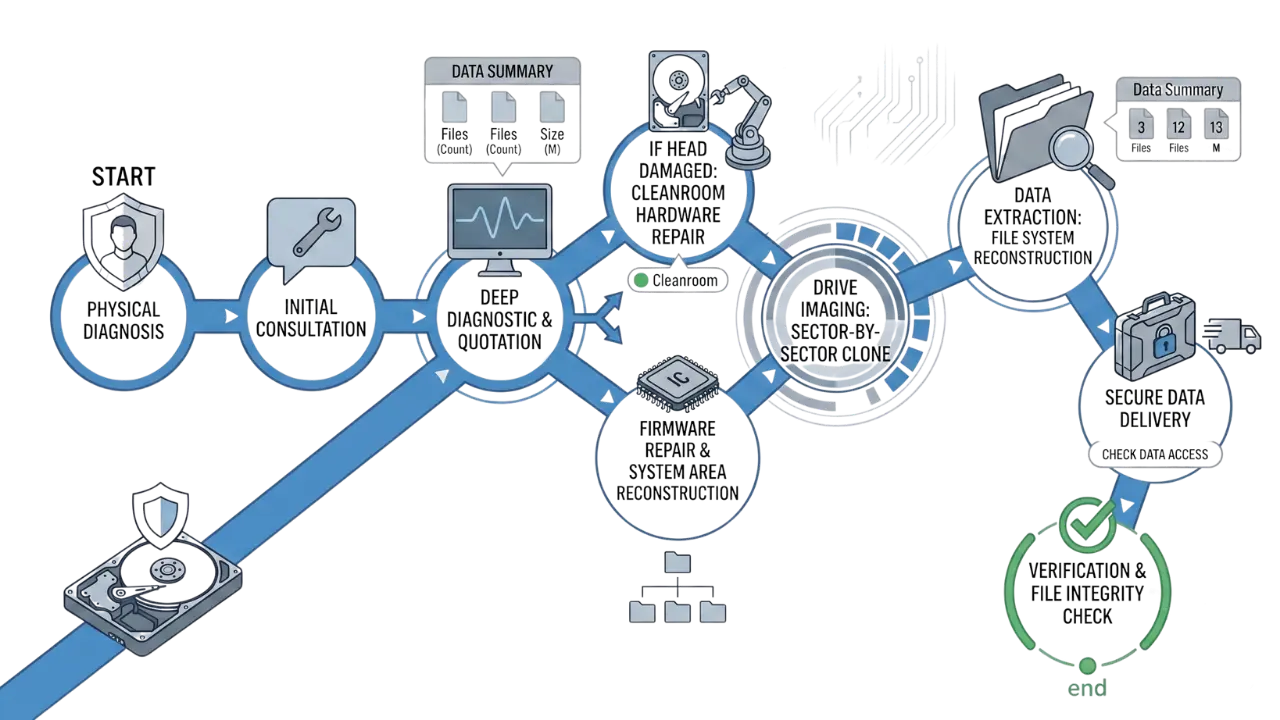
Reduced Recovery WindowOur Professional HDD Recovery Workflow - Step by Step
Transparency is central to our service. Here is exactly how we recover your hard drive data from the moment you contact us to the moment your files are returned safely.
Initial Diagnosis & Free Phone Evaluation
You describe the symptoms to our engineer over phone or WhatsApp. Based on your description, we classify the failure type (logical vs. physical vs. firmware), give you an honest recovery probability assessment, and explain the process completely free, no-commitment required. If needed, we arrange walk-in at our Andheri East, Mumbai lab.
Deep Diagnostic & Quotation
Once the drive arrives at our lab, engineers perform a full technical diagnostic: PCB inspection, firmware module check, SMART analysis, head health assessment, and cleanroom inspection if physical damage is suspected. You receive a transparent quotation with exact cost and a realistic file recovery list. before any work begins. No hidden charges.
Drive Imaging - Sector-by-Sector Clone
We never work directly on your original failing drive. Using professional tools (PC-3000, DeepSpar Disk Imager), we create a complete sector-by-sector image of the drive, handling read errors with intelligent retry strategies. All recovery work is performed on this image clone, preserving your original drive in its exact state throughout the process.
Cleanroom Hardware Repair
Mechanical failures - head crashes, seized motors, actuator jams, require intervention in our ISO-standard cleanroom environment. In a particle-controlled environment equivalent to a Class 100 clean room, our engineers perform delicate procedures including head stack transplantation, platter swaps, and PCB ROM micro-soldering operations impossible without professional cleanroom conditions.
Firmware Repair & System Area Reconstruction
For firmware-corrupted drives (Seagate, WD, Toshiba), we use PC-3000 professional recovery tools to access and repair the drive's System Area directly. This involves rewriting corrupted translator modules, reconstructing defect lists, and restoring operational firmware without overwriting any user data regions on the platters.
File System Reconstruction & Data Extraction
From the recovered image, we reconstruct the file system, recover deleted or corrupted partition tables, and extract all recoverable files using professional data recovery software. Files are organized by type and folder structure wherever possible, and are verified against a quality checklist before delivery.
Verification & File Integrity Check
Recovered data is reviewed for completeness against the initial file list provided by you. Document files are opened and verified. Media files (photos, videos) are spot-checked for playability. You receive a full report of recovered files so you can confirm before final delivery another aspect of our no-surprise service commitment.
Secure Data Delivery
Recovered data is securely delivered on a new external hard drive, pen drive, or via our encrypted cloud link, your choice. All recovered data is securely wiped from our systems after delivery is confirmed. If recovery was not successful, you pay absolutely nothing under our No Data, No Charge guarantee.
Brand-Specific Hard Disk Recovery Expertise
Each hard drive manufacturer uses unique firmware architectures, proprietary defect management systems, and different mechanical designs. Our engineers have brand-specific expertise and access to compatible donor drives for all major manufacturers.
- BSY (Busy) firmware bug drive gets stuck in BSY loop and goes undetected
- LDR (Loader) firmware module corruption very common in 7200.11 / CC series
- Head Degradation Recovery heads degrade gradually before complete failure
- Seagate One Touch external drive PCB and head recovery
- SkyHawk CCTV drive recovery with data structure reconstruction
- Seagate Barracuda clicking sound recovery head swap in cleanroom
- ROM Transplant for PCB failures unique adaptive data transfer
- WD My Passport head failure and firmware recovery
- WD Green DPTR module corruption translator module repair
- WD Purple CCTV drive recovery overwritten footage analysis
- WD My Book spinning but not detecting on PC, PCB firmware issues
- WD Elements not initializing partition and file system recovery
- Toshiba Canvio portable drive head failure dropped drive recovery
- L200 laptop HDD slow response and bad sector recovery
- Toshiba P300 desktop HDD firmware module reconstruction
- Toshiba drive detected but inaccessible, logical file system repair
- Toshiba X300 mechanical failure recovery - platters intact
- HGST Deskstar spinning but not detecting - service area corruption
- HGST Ultrastar enterprise drive head swap and platter recovery
- Travelstar laptop drive firmware module repair
- HGST drives with severe bad sector proliferation - sector-level imaging
- Samsung SpinPoint series PCB failure with ROM transplant
- Samsung M8 laptop HDD mechanical recovery
- Samsung HDD sector damage and logical corruption repair
- Legacy Samsung storage recovery with compatible donor acquisition
- LaCie external drive head failure and USB bridge board repair
- Transcend StoreJet dropped external drive recovery
- Buffalo DriveStation NAS array data recovery
- QNAP and Synology NAS RAID reconstruction and recovery
Data Recovery for Every Industry & User Type
From individual users to enterprise IT teams - Mumbai Data Recovery is equipped for every scale and complexity of data loss scenario.
Home Users
Personal photos, videos, documents, music collections from desktop and laptop hard drives.
Small Businesses
Accounts data, client files, inventory records, emails from office workstations and external HDDs.
IT Companies
Server drives, development environments, database files, and deployment backups.
IT Dealers
Partner referral programme with competitive rates. Hundreds of dealer partners across India.
CCTV / Security
DVR/NVR footage recovery including overwritten surveillance data for legal and insurance purposes.
Enterprises & Corporates
Business-critical data, ERP databases, HR records, and compliance documents from enterprise storage.
Content Creators
Raw footage, project files, Adobe Premiere/Final Cut libraries, and 4K/8K video from production drives.
Gamers
Game libraries, save files, modding projects, and streaming content from gaming HDDs.
Photographers
RAW files, Lightroom catalogues, client shoot archives, and professional portfolio backups.
NAS & RAID Users
Multi-drive array recovery including RAID 0, 1, 5, 6, 10. Synology and QNAP specialisation.
Server Administrators
Physical and logical server drive recovery including SAS, SCSI, and iSCSI attached storage.
Legal & Forensics
Digital forensics and legally defensible data extraction with full chain-of-custody documentation.
Hard Drive Recovery Across All of India
Our lab is based in Andheri East, Mumbai but we recover data for clients across every state and city in India. Sending your drive is simple, secure, and tracked from end to end. Most clients outside Mumbai prefer our courier-based service with regular updates.
Major Cities We Serve
Accepted couriers: Blue Dart · DTDC · Delhivery · India Post · FedEx · Ekart · DHL · XpressBees · Ecom Express · Shadowfax · Trackon · Professional Couriers · Shree Maruti Courier
Send Your Drive - Free Evaluation Over CallHow to Send Your Drive From Any City
Step 1 - Pack Safely
Wrap the hard drive in bubble wrap. Place in a sturdy cardboard box with padding on all sides. Do NOT use foam peanuts alone hard drives need firm, non-shifting cushioning.
Step 2 - Ship via Reliable Courier
Use DTDC, Blue Dart, FedEx, or Delhivery for reliable tracking. Mark the package as "Fragile Electronic Components." WhatsApp us the tracking details so we watch for arrival.
Ship To Our Lab
Step 3 - We Send Back Your Drive + Data
After successful recovery, we ship your original drive back along with a new storage device containing your recovered data, both fully insured and tracked.
FREQUENTLY ASKED QUESTIONS
Everything You Need to Know About Hard Disk Data Recovery
No questions match your search.
Hard disk data recovery is the process of retrieving inaccessible, deleted, corrupted, or lost files from a failed hard drive. Recovery methods depend entirely on the root cause of the data loss.
Logical failures such as accidental deletion, formatting, or file system corruption can often be recovered using specialized software techniques that rebuild directory structures and scan for recoverable file signatures. The drive is mechanically healthy in these cases, only the software layer is damaged.
Physically damaged hard drives require a different approach entirely. Cleanroom procedures and hardware repairs must be completed before data extraction can begin. This involves repairing or replacing internal components such as read/write heads, the spindle motor, or the PCB (Printed Circuit Board) inside a controlled environment free of airborne contaminants.
Professional data recovery services use advanced hardware imaging tools and platform specific diagnostic software to recover documents, photos, videos, databases, and all other critical file types from damaged HDDs.
The cost of hard disk data recovery in India varies based on three main factors: the drive's storage capacity, the type of failure, and the complexity of the recovery work required.
Logical recoveries covering accidental deletion, accidental formatting, partition loss, and file system corruption on a mechanically healthy drive are generally the least expensive category since no hardware repairs or cleanroom work are involved.
Physical recoveries requiring cleanroom intervention involve additional costs for technician time, specialised equipment access, and donor replacement parts. Enterprise drives, high capacity HDDs, and drives with multiple simultaneous failure modes carry higher recovery costs.
The exact cost can only be determined after diagnosing the hard drive. At Mumbai Data Recovery, every case begins with a free evaluation and a transparent quote. You are not committed to any payment until the quote is accepted and you pay nothing at all if data is not successfully recovered.
Recovery timelines depend on the severity of the damage and the volume of data involved. Here is a general breakdown:
Simple logical recoveries (deleted files, formatted partitions, minor file system corruption) can often be completed within 1 to 3 business days.
Physical damage cases requiring cleanroom procedures such as head replacement, motor repair, or PCB transplant typically take 3 to 7 business days. This includes time for component sourcing and cleanroom preparation.
Complex scenarios such as multiple simultaneous head failures, severe bad sector escalation, RAID reconstruction, or firmware module regeneration can take 7 to 15 business days or more, depending on the platform and severity.
Emergency priority recovery service is available for urgent business critical, legal, and personal situations. Walk in clients at our Mumbai lab can begin the evaluation process the same day.
Success rates vary significantly by failure type and how the drive was handled after the initial failure. As a general guide:
Logical failures (deleted files, accidental formatting, file system corruption) have near 100% recovery rates when the drive is powered off immediately and not used further after the data loss event.
Single head failure physical cases achieve 85 to 95% success when recovered by a professional lab without prior DIY attempts.
Multi head failures achieve 70 to 85% success rates. Severe platter damage (surface scoring from a head crash) carries a lower probability of 40 to 60% for full recovery.
The single most important variable is how quickly the drive is powered off after failure and whether professional help is sought before any DIY recovery attempts. Every additional power cycle on a physically failing drive reduces the success window.
Mumbai Data Recovery achieves a 95%+ overall success rate across all HDD case types, based on 10,000+ recoveries since 2010.
No reputable data recovery company can guarantee full recovery before examining the hard drive. Recovery outcome depends on factors that can only be assessed after physical and logical diagnosis including the extent of platter damage, whether data has been overwritten, the condition of the head assembly, and whether prior recovery attempts have been made.
What a professional lab can provide is an honest, detailed evaluation of recovery probability before any work is committed. At Mumbai Data Recovery, every case receives a transparent assessment of what is recoverable, with realistic expectations communicated upfront.
Our guarantee is simpler and more meaningful than a vague promise: you pay nothing if we cannot recover your data. The risk is entirely ours.
If recovery is not possible, you will receive a detailed explanation of the failure mode and the specific technical reasons why data could not be retrieved. This report can be valuable for insurance claims, legal proceedings, or understanding whether a second opinion is warranted.
Under our No Data, No Charge policy, you owe nothing for the evaluation or the recovery attempt if we are unable to deliver the required files. Your original drive is returned in the same or better condition than when it was received.
The only exception is if a client specifically requests destructive intervention (such as platter polishing or component sacrifices to attempt a partial extraction) even after being clearly informed of the low probability. This is always communicated and agreed to explicitly before proceeding.
Yes, unconditionally. Under our No Data, No Charge policy, recovery fees are charged only when the requested data is successfully recovered and verified. If we cannot recover your data, the service is completely free.
This policy is applied to every case without exception and requires no special arrangement or negotiation. It is the standard at Mumbai Data Recovery because we believe the financial risk of a failed recovery should never fall on the client.
Yes. All data processed at Mumbai Data Recovery is handled under strict confidentiality protocols. Our technicians access files only to the extent necessary to verify recovery completeness. They do not view, copy, or retain personal or business data beyond what the recovery process requires.
Recovered data is never stored on our systems after it has been delivered to the client. We can provide a signed Non Disclosure Agreement (NDA) for corporate clients, legal cases, and any situation involving sensitive business, financial, or personal data.
Confidentiality is not an add on service, it is the default standard for every case, large or small.
A cleanroom is a controlled environment with strictly managed levels of airborne particles, temperature, and humidity. Hard drives are manufactured and must be opened only under ISO Class 5 (Class 100) conditions, meaning fewer than 100 particles per cubic foot of air.
To understand why this matters: a read/write head floats just 3 to 5 nanometres above the spinning platter surface, a gap thinner than a single virus. A human hair is 70,000 to 100,000 nanometres wide. A particle of household dust landing on a spinning platter will cause an immediate head crash, gouging the magnetic coating and destroying data permanently in that zone.
Opening a hard drive outside a certified cleanroom even briefly, even in a "clean" room almost always results in permanent data loss due to contamination. This is true even if the opening is careful and the exposure time is short.
A clicking hard drive is almost always a sign of a serious mechanical failure. The most common cause is damaged or misaligned read/write heads that are attempting to seek data moving to a position on the platter, failing to read, returning to the home position, and repeating the cycle. This creates the characteristic rhythmic clicking sound known as the "click of death."
Other causes include firmware issues causing the drive to enter a reset loop, a partially seized spindle motor, or physical actuator arm damage.
The critical action is to power off the drive immediately. Every rotation of a clicking drive risks the misaligned heads making contact with the platter surface scoring the magnetic coating and permanently destroying data in those sectors. The longer the drive runs in this state, the more of the platter surface is damaged and the lower your recovery probability becomes.
Yes, in many cases. Whether a dropped drive is recoverable depends heavily on whether the drive was powered on or off at the moment of impact.
Powered off drop: When a drive is off, the read/write heads are parked on a ramp away from the platter surface. A drop in this state typically causes actuator arm damage, ramp damage, or head parking failures. These are cleanroom recoverable scenarios with good success rates.
Powered on drop: When a drive is running, the heads are actively floating above the platter surface. An impact can cause immediate head to platter contact, resulting in surface scoring. This is a more complex recovery scenario with lower success rates depending on the extent of the scoring.
In both cases: do not power the drive back on to "check" whether it still works. This is the most common mistake made after a drop and significantly reduces recovery probability.
Yes. Professional data recovery labs can often recover data from physically damaged hard drives using specialised equipment and ISO certified cleanroom environments. Physical damage is not the same as permanent data loss.
Common physical failures that are routinely recovered include: head crashes (cleanroom head assembly replacement), spindle motor failure (motor transplant or platter migration), PCB damage (component level repair with ROM transplant), and firmware corruption (platform specific service tools).
The magnetic data on platters survives most physical component failures because the platters themselves are among the most durable components in the drive. As long as the platter surface has not been scored by a head crash, the data is generally intact and extractable once the mechanical failure is repaired.
A hard drive that is not detected by the computer can have several distinct root causes, each requiring a different recovery approach:
PCB failure: A damaged printed circuit board prevents the drive from initialising. The drive may not spin up at all, or may spin but not communicate with the system.
Firmware corruption: The drive's internal firmware (stored in a reserved area of the platters called the Service Area) may be damaged. The drive spins up but fails to complete initialisation, or shows with 0 capacity or the wrong model number.
Head failure: Damaged read/write heads prevent the drive from reading its own firmware or producing valid responses to the system's detection queries.
File system corruption: The drive is detected at hardware level but the operating system cannot mount it due to corrupted partition tables or file system metadata.
Professional diagnosis is the only reliable way to identify the specific cause. Attempting to force mount or repeatedly power cycle an undetected drive can worsen whatever underlying issue exists.
In many cases, yes but immediate power off is critical. Grinding and beeping sounds indicate different failure modes:
Grinding: Usually means the read/write heads are in contact with the platter surface, or that the spindle motor bearings have failed. Continued operation in this state rapidly scores the platter coating and destroys data irreversibly.
Beeping: Typically indicates a seized spindle motor unable to spin the platters. The beeping is caused by the motor controller repeatedly attempting and failing to spin up. Unlike grinding, beeping generally does not cause additional data damage but the drive should still be powered off immediately to prevent any mechanical escalation.
Because every power on attempt can cause further damage, the drive should be switched off at the first sign of unusual sounds and assessed by a professional recovery lab as soon as possible.
Hard drive failures arise from a wide range of causes, which is why recovery approaches vary so significantly from case to case. The most common causes include:
Physical shock: Dropping a drive particularly while powered on is one of the leading causes of head crash and actuator arm damage.
Power surges: Voltage spikes from UPS switching, inverter fluctuations, and lightning events can fry the PCB or corrupt firmware in milliseconds.
Overheating: Sustained operation above 50°C accelerates bearing lubricant degradation, increases bad sector formation, and can cause platter warping in older drives.
Firmware corruption: Manufacturing defects, interrupted firmware updates, and bad sector development in the Service Area zone can corrupt the drive's operating logic.
Wear and tear: Consumer grade HDDs are rated for a finite number of load/unload cycles and hours of operation. Most fail between 3 and 7 years of use depending on the drive class.
Water and liquid damage: Moisture causes immediate corrosion on the PCB and connectors. Powering on a wet drive causes short circuits that can permanently destroy electronics.
Manufacturing defects: A small percentage of drives ship with latent defects that cause early failures, often within the first 6 to 18 months of operation.
Yes, in many cases. Water itself does not damage magnetic data on platters the platters are sealed inside the drive casing. What causes damage is the corrosion from dissolved minerals and salts in the water, and the electrical short circuit caused by powering on a wet PCB.
The single most important rule for water damaged drives: do not power it on. This is also the most commonly violated rule. Plugging in a water damaged drive "to see if it works" often causes immediate, permanent PCB destruction.
The correct approach is to keep the drive in its wet state (do not try to dry it with heat or sunlight) and courier it to a recovery lab as quickly as possible. A wet environment actually slows corrosion compared to a partially dried one where mineral deposits form on contacts.
Professional recovery involves PCB cleaning and repair, connector inspection, head assembly assessment under controlled conditions, and cleanroom platter recovery if necessary.
Follow these steps in order:
1. Turn off the device immediately and disconnect all power sources. If the drive is in a laptop or desktop, shut down the machine do not wait for it to fully boot, just hold the power button.
2. Do not power it on to test whether it still works. This is the single most damaging thing you can do to a water exposed drive.
3. Do not attempt to dry it using heat, sunlight, compressed air, or a hairdryer. Heat accelerates mineral deposit formation on contacts and connectors.
4. Place the drive in a sealed zip lock bag in a safe, room temperature environment away from further moisture, sunlight, and magnets.
5. Contact a professional data recovery laboratory as soon as possible. Speed matters the longer water remains in contact with metal components, the more corrosion develops. Aim to reach a professional lab within 24 to 48 hours of the incident.
In many cases, yes. Hard drive platters are made from highly durable aluminium or glass substrates coated with magnetic oxide. They can survive temperatures that destroy the drive's external casing, PCB, and connectors because the platter enclosure provides some thermal protection to the most critical components.
Fire damaged drives may suffer from heat warped casings, melted connectors, smoke contamination on PCB contacts, and in severe cases, platter deformation. Professional recovery labs use specialised techniques to recover data from drives that have been exposed to fire and extreme temperatures including PCB replacement, connector bypass, and cleanroom platter inspection.
Even significantly fire damaged drives are worth submitting for professional evaluation. The platters are often the last component to fail and may contain intact data long after everything else has been destroyed.
Yes, in most cases. Formatting whether quick or full does not immediately erase the actual data content of your files.
A quick format removes only the file system metadata: the partition table and the directory entries that tell the operating system where files are located. The data sectors remain completely intact. Quick format recoveries have near 100% success rates when the drive is not used after the format.
A full format writes zeros or random data to sectors in sequence, which progressively overwrites file data. However, a full format takes time if it was interrupted, or if you realised the mistake quickly, a partial or full recovery is still often possible depending on how much of the format completed.
The critical rule: stop using the drive immediately after accidental formatting. Every file you save, every application you run, every OS operation writes new data that could overwrite recoverable sectors.
Possibly, yes. When a file is deleted, the operating system removes its directory entry and marks those storage sectors as "available for reuse." The actual file data remains in those sectors until the OS needs the space and assigns new data to overwrite it.
The longer a drive has been in use after deletion, the higher the probability that some of those sectors have been overwritten by subsequent file operations. However, HDDs do not overwrite sectors randomly they follow allocation patterns. Older deleted files often survive on drives that have been moderately used because the OS tends to use newly freed space before older freed space.
Even partially overwritten files can sometimes be reconstructed using file carving techniques that identify file headers and footers from raw sector data without relying on directory information.
The best outcomes are always when recovery is attempted as soon as possible after deletion, with minimal use of the drive in the intervening period.
Yes. Deleted photos, videos, and other media files can very often be recovered if they have not been overwritten by new data. Professional recovery tools scan the storage media at the raw sector level, identifying file signatures (JPEG, RAW, CR2, NEF, ARW, MP4, MOV, AVI, and many more) and reconstructing recoverable files even when the directory structure has been completely removed.
This approach called file carving works independently of the file system metadata, meaning it can recover files even after a format, partition deletion, or complete directory corruption.
We prioritise file types based on client requirements. If your most critical data is a specific set of photos or video files, let us know we can target those file types first and verify previews before any payment is required.
Once data is overwritten by new information on a magnetic hard drive, recovery of the original content becomes extremely difficult or practically impossible. Unlike some older magnetic media where faint magnetic "ghosts" of previous data could theoretically be read, modern HDDs write with sufficient precision that overwritten sectors contain only the new data the previous signal is gone below the noise floor.
This is why stopping all use of an affected drive immediately after data loss is the single most important action you can take. Every operation on a running OS temporary files, swap files, system logs, application writes continuously overwrites sectors that might contain recoverable data.
Partial overwrite scenarios (where only a portion of a file's sectors have been overwritten) can sometimes yield a partially reconstructed file, which may be better than nothing for certain use cases like recovering most of a database or most of a video file.
File system corruption occurs when the metadata structures used to organise your data become damaged or inconsistent. In NTFS (Windows), this involves the Master File Table (MFT), boot record, and journal log. In exFAT, it involves the FAT allocation tables and directory clusters. In Linux EXT4, it involves the superblock, inode tables, and journal.
Common causes include: sudden power loss mid write, OS crashes during disk operations, malware attacks on file system structures, and bad sector development in critical metadata zones.
The important point is that file system corruption almost always leaves the underlying data sectors intact. The actual file content is still there it is the roadmap to finding it that is broken. Professional recovery tools rebuild these structures from available metadata fragments, file signatures, and journal data to reconstruct a readable directory and extract files.
Note: running Windows' CHKDSK or similar tools on a severely corrupted file system can sometimes worsen the damage by writing correction attempts that overwrite recoverable metadata. For anything beyond minor corruption, professional intervention is the safer route.
Yes, recovery is often possible after a Windows reset or reinstallation, depending on what exactly happened during the process and how much new data has since been written to the drive.
A Windows "Reset this PC Remove everything" operation overwrites the system partition but typically does not perform a secure wipe. Data files on non system partitions (a D: drive, for example) are usually unaffected. Data on the C: partition may be partially or fully overwritten depending on the reset type chosen.
A clean Windows reinstallation that formats the target partition progressively overwrites that partition's data sectors during the installation process. The success rate of recovery depends on how much of the original partition was reached before you realised the mistake.
If additional software, files, or updates were installed after the reset, each of these operations reduces the amount of recoverable data. Act as quickly as possible and stop using the drive.
Consumer recovery software (Recuva, EaseUS, Stellar, PhotoRec) is designed exclusively for logically healthy drives with purely software layer failures deleted files, formatted partitions, minor corruption. On a mechanically healthy drive, these tools can be effective.
The problem is that recovery software cannot:
Repair damaged read/write heads or seized motors
Reconstruct firmware module corruption
Operate safely on drives with escalating bad sectors (it causes more damage)
Perform cleanroom procedures to open and repair internal components
Produce a sector level image before recovery (which preserves the best chance of full extraction)
Worse, running software on a physically damaged drive keeps the drive powered on, causing additional head passes over damaged platter areas. This frequently converts a 90% success scenario into an unrecoverable one.
Professional recovery services use hardware imaging tools that operate at the drive's interface level with adaptive algorithms specifically designed to handle degraded media before any file level recovery is attempted.
No. Running recovery software on a clicking hard drive is one of the most damaging things you can do to a drive in that state. Here is why:
A clicking drive has physically damaged or misaligned read/write heads. Recovery software works by commanding the drive to read sectors across the entire platter surface. Each read attempt causes the damaged heads to sweep across the platter repeatedly. With each pass, misaligned heads risk making contact with the platter surface, scoring the magnetic coating and permanently destroying data in those sectors.
A 4 hour scan with recovery software on a clicking drive can convert a case that would have been 90% recoverable in a cleanroom into one where significant platter scoring has occurred and recovery probability has dropped below 40%.
The correct action for a clicking drive is: power off immediately, do not run any software, and contact a professional cleanroom recovery service. The first recovery attempt is always the best chance.
No. Opening a hard drive outside a professional cleanroom almost always causes permanent, irreversible data loss. This is not an exaggeration or a scare tactic, it is a physical reality.
Hard drives are sealed with a breather filter designed to allow pressure equalisation while keeping particles out. The internal gap between the read/write heads and the platter surface is 3 to 5 nanometres far smaller than any visible particle. A single particle of household dust (typically 1,000 to 100,000 nanometres in diameter) landing on a spinning platter causes an immediate head crash, gouging the magnetic coating.
Cleanrooms used for professional HDD work maintain fewer than 100 particles per cubic foot of air a standard that requires HEPA filtration systems, positive air pressure, gowning protocols, and regular particle count certification. An ordinary room however clean it appears contains millions of particles per cubic foot.
Even experienced engineers do not open drives outside their certified cleanrooms. The risk is simply too high.
Real Stories. Real Recoveries.
Rated 4.9 stars on Google by 384+ verified clients. Here's what people say about recovering their most important data.
Trustindex verifies that the original source of the review is Google. Very very good mujhe bahut achcha Laga inhone mujhe Mera 100% data recover karke Diya aur vah bhi limit samay mein aur reasonable wajib price ke andar bahut hi achcha Laga mujhe thank u so Mach sar aapki vajah se mera kam ho Paya main aapko kya kahun Main itna depression mein tha ki yah data mujhe milane ke bad sari tension dur Ho Gaye thank u so Mach sar jiPosted on GoogleTrustindex verifies that the original source of the review is Google. Thanks Akshay Sir, *(Mumbai Data Recovery)* Thank you once again for your outstanding expertise in successfully recovering my client's precious data from their damaged storage device. The client is absolutely thrilled and deeply grateful to have access to their old family photos, cherished memories, and critical documents that they thought were lost forever. Your prompt and professional service has not only resolved their issue but also strengthened their trust . We truly appreciate your dedication and skill in handling such challenging data recovery tasks.Posted on GoogleTrustindex verifies that the original source of the review is Google. It's the best Data recovery service available in Mumbai. i had given them my dead hdd which they recovered in around 4 days with full coordination about data verification and paymentPosted on GoogleTrustindex verifies that the original source of the review is Google. Amaze with the service and the way Akshay bhai taken care my case and got my data back..kudosPosted on GoogleTrustindex verifies that the original source of the review is Google. Good service, quick service and affordable Price. I recomend to every one Mumbai data recovery is best Data recovery in IndiaPosted on GoogleTrustindex verifies that the original source of the review is Google. My 1 TB WD hard disk was not getting detected. I showed it to Mumbai Data Recovery.. within 2 to 3 working days they were able to retrieve my Data. They are very honest and genuine about the service offered. I am very happy about the service provided. I would recommend everyone who wants the data recovered. Do contact them… Thank you Mumbai Data Recovery Centre…Posted on GoogleTrustindex verifies that the original source of the review is Google. Acha ricavry karte he saste dam pePosted on GoogleTrustindex verifies that the original source of the review is Google. Good service quark computersPosted on GoogleTrustindex verifies that the original source of the review is Google. Clients satisfaction is the first priority for us & that I got from you for the date recovery, very nice
Start Your Free Hard Drive Evaluation Today
No obligation. No payment until data is recovered. Our team responds within 30 minutes during business hours.
Call for Immediate Help
+91 98925 15536
After Hours Emergency Support
WhatsApp Assistance Available
WhatsApp Consultation
wa.me/919892515536
Send photos of the drive, describe the issue
Email Support
Datarecoveryservices9@gmail.com
We respond within 2 hours
Visit Our Lab
Unit No. 102, New Apollo Estate,
23 Avadh Narayan Tiwari Marg,
Andheri East, Mumbai – 400069
WORKING HOURS
No Data, No Charge - Guaranteed
We evaluate your hard drive completely free of charge. You receive a detailed assessment, recovery probability, and transparent pricing before any work begins. If we cannot recover your data, you pay nothing.
💬 WhatsApp Free Evaluation📞 Call +91 98925 15536
🗺 View on Google Maps · Andheri East, Mumbai
Pan-India courier pickup available from all 28 states